Duplicates and errors: how to fix them
Governing identifiers Allocating and maintaining GTINs Lesson 6 of 12
Identification errors are detected at three moments: when the record is loaded (the GDSN validators and the rules of your own register flag them), when the customer approves the product (its listing checks), and — the worst scenario — when the product is already in the channel and two items share a GTIN or a GTIN doesn't match its record.
The serious case: a GTIN shared by two products
The rule is direct and not open to negotiation: the GTIN of one of the two products is withdrawn and it is given a new one, informing the affected customers and managing the transition (stock in the channel, online listings, labels in the warehouse). A shared GTIN isn't “repaired” by choosing which of the two “keeps it”: uniqueness is the property that gives the whole system its value, and restoring it is immediate even if it hurts.
The cost of the correction is the lesson that remains: reprinting labels, updating records, and explaining to the buyer why their system mixed up the sales of two products for weeks. That is why a central GTIN register with a single person responsible for setting up numbers is cheaper than any correction.
The common cases and how to fix them
Data error (weight, description, category): the record is corrected and resynchronised via GDSN — without touching the GTIN. Symbol printing error (check digit calculated wrongly, illegible bars): the print template is corrected and, if the product is already in the channel, it is decided with the customer whether to relabel or reject the consignment. A GTIN allocated twice internally but only one reached the market: the duplicate is withdrawn from circulation and documented.
The audit that prevents disaster
Once a year, a simple cross-check: each GTIN in your register against its record, and each printed symbol against its GTIN. With small catalogues it takes an afternoon; with large ones, an SQL query or the audit function of your data pool. Errors found in an audit are corrections; those found by the customer are incidents.
How a duplicate is detected
It is almost never detected by whoever made it. It shows up when a retailer tries to list the product and its system replies that the GTIN already exists for another item, or when the stock of an item behaves in an impossible way — sales of an item that hasn't been made. By then there is usually product out in the market.
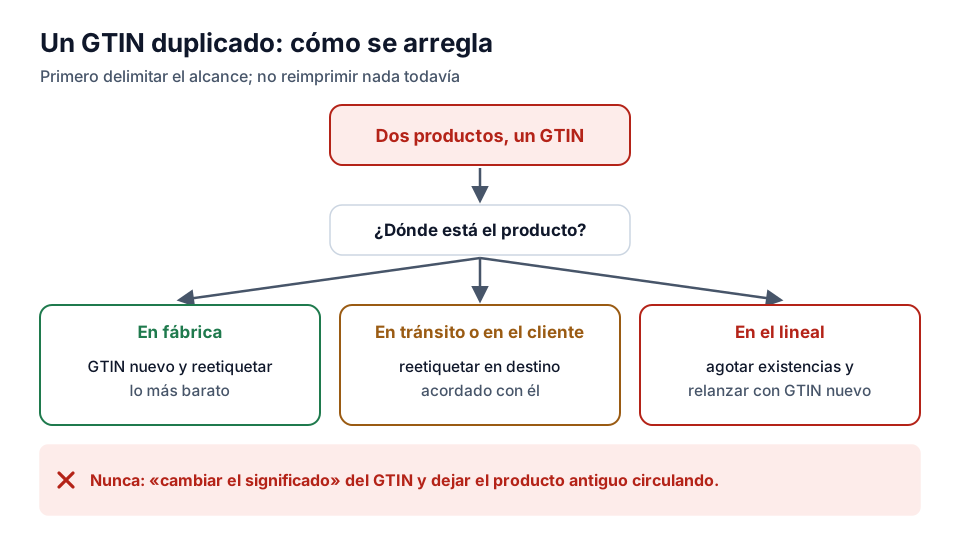
The first step is always the same: don't reprint anything yet. You have to establish the scope — which items, which batches, which customers — before deciding, because the solution depends on whether the product is in the factory, in transit or on the shelf.
The three possible ways out
If the product hasn't left yet, a new GTIN is allocated and it is relabelled: by far the cheapest option. If it is in transit or in the customer's warehouse, relabelling at destination is agreed with them, which costs money but is feasible. If it is already on the shelf, the only honest way out is to sell off the stock with the wrong code and launch the new product with the correct GTIN, documenting the overlap.
What never works is “changing the meaning” of the GTIN in the catalogue and leaving the old product in circulation: that turns a one-off error into a permanent error in every history.
Exercise
Duplicates in the catalogue
What characterises a duplicate GTIN in a company's catalogue?
- It has an incorrect check digit
- Two different products share the same GTIN in the systems
- Its prefix doesn't start with 84
Related lessons
Reading is free. When you sign up, you also:
- You save your progress and pick up where you left off
- You take the exams, marked straight away
- You receive a completion record, with your name, for each course you finish
- You ask and answer in the Community (in Spanish)
- You get the PRO level by adding your products
- With PRO, you unlock the advanced tools: labels, GS1-128 and SSCC
Unlock PRO tools and completion records Free. The team reviews every application.
Already have access?Mark this lesson as read in My academy
This lesson is part of the course GS1 and Regulatory Labelling, from the Barcode and Traceability Academy.
This module includes the exam “Module 2 exam: Governance and AIs”.
Next lesson What an AI is and how to read it 6 lessons left in the course