Synchronising data with customers (GDSN)
Governing identifiers Allocating and maintaining GTINs Lesson 5 of 12
The GDSN (Global Data Synchronisation Network) is GS1's network for synchronising product master data between manufacturers and retailers: regulatory description, dimensions, weights, regulatory image, allergens, nutritional attributes, reference prices and the whole record the channel needs to sell your product. The manufacturer publishes the record in its data pool; the retailer receives it, validates it against its rules and activates it in its systems.
Why it exists: the end of manual entry
Without GDSN, each retailer lists your product by typing in your record — with the errors, variants and outdated versions that implies. With GDSN, the record exists once (yours), is synchronised to all customers and is updated for all of them at the same time when you change something regulated. It is the difference between one official version of the product and forty copies made by hand.
How it works in practice
Your record is built according to the GS1 attribute standards (each sector has its profile), passes validation by your certified GDSN data pool and is published to the recipients you accept. The retailer receives it with your GTIN as the key, checks it against its loading rules and activates it. Any future change — weight, allergen, image — is published as a new synchronised version, with a date and a trace of who approved it.
What the channel requires and what suits an SME
Large retail groups have required listing via GDSN as a condition for years; marketplaces check the consistency of your data even if they don't use GDSN directly. For an SME the practical message is: your master data is part of the product. A flawless GTIN with a badly loaded record — wrong weight, wrong category, non-compliant photo — causes returns, incidents and blocks in the online channel just as much as a badly printed barcode.
The right order for listing
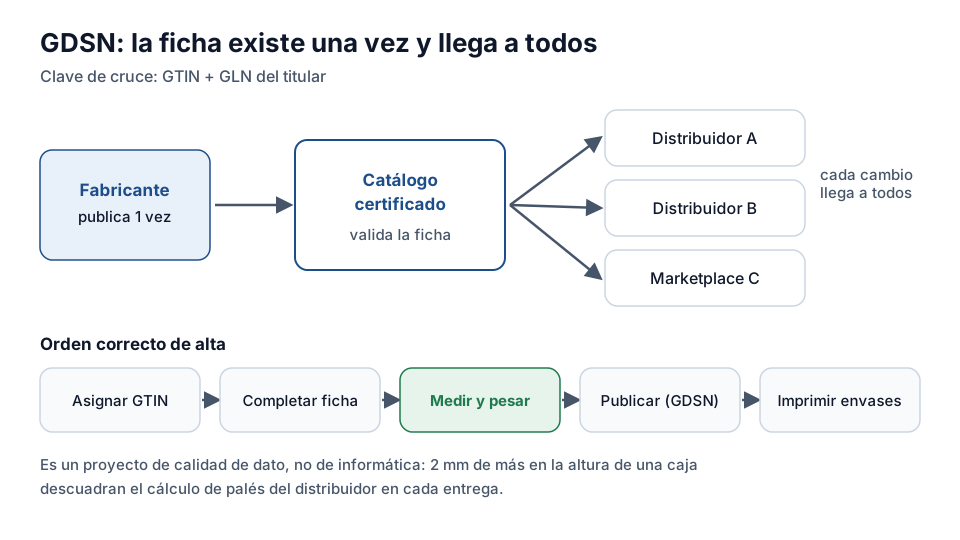
The professional sequence: allocate the GTIN (golden rule), complete the master data record with correct regulatory attributes, validate (real dimensions, real weights, regulatory images), publish via GDSN to your customers, and only then print packs. The record behind the symbol must exist before the symbol — not the other way round.
What problem it solves
Without synchronisation, each retailer asks for the product record in its own format and through its own channel, and each change has to be communicated as many times as there are customers. The well-known result: outdated catalogues, weights that don't match, out-of-date allergens and rejections at goods receipt.
The GDSN — Global Data Synchronisation Network — reverses the flow: the manufacturer publishes the record once in its certified catalogue and subscribing retailers receive each change automatically. The matching key is the pair GTIN + GLN of the owner, and that is why everything earlier in the course matters.
What you need before you start
A GDSN project almost always fails for the same reason: it is approached as an IT integration when it is a data quality project. Before connecting anything you need correctly allocated GTINs, dimensions and weights physically checked — not copied from the technical sheet — and one person responsible for keeping them up to date.
The check that avoids the most rejections is the most obvious one: actually measure and weigh one unit of each item. A two-millimetre difference in the height of a case throws out the retailer's pallet calculation and generates an incident with every delivery.
Exercise
Synchronising product records
What is synchronising product data with customers (GDSN) for?
- To send advertising by email
- So that all customers have the same product master record (GTIN, weight, dimensions)
- To calculate VAT in each country
Related lessons
Reading is free. When you sign up, you also:
- You save your progress and pick up where you left off
- You take the exams, marked straight away
- You receive a completion record, with your name, for each course you finish
- You ask and answer in the Community (in Spanish)
- You get the PRO level by adding your products
- With PRO, you unlock the advanced tools: labels, GS1-128 and SSCC
Unlock PRO tools and completion records Free. The team reviews every application.
Already have access?Mark this lesson as read in My academy
This lesson is part of the course GS1 and Regulatory Labelling, from the Barcode and Traceability Academy.
This module includes the exam “Module 2 exam: Governance and AIs”.
Next lesson Duplicates and errors: how to fix them 7 lessons left in the course