What an AI is and how to read it
Governing identifiers Application Identifiers (AI) Lesson 7 of 12
Application Identifiers (AI) are the numerical prefixes in the GS1 standard that define the meaning of the data that follows them. AI (01) means “here comes a GTIN”; (10), “here comes a batch number”; (17), “here comes an expiry date”. They are the vocabulary that lets different data go into the same symbol without ambiguity — the scanner doesn't guess what each item is: the structure tells it.
How a GS1 string is read in practice
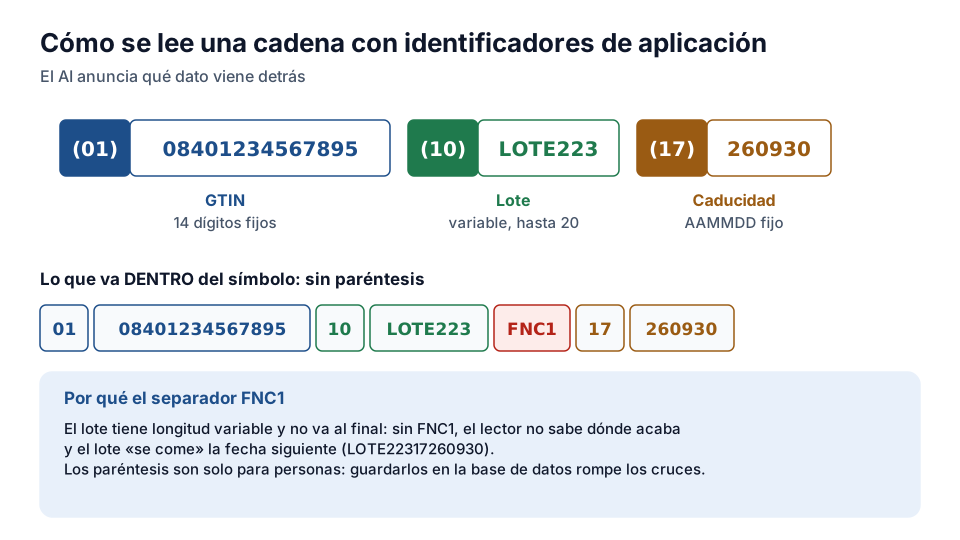
It is read like a mini-language: the AI announces the field, the field follows in its format, and when a field is of variable length and another follows it, a separator (the FNC1 character in the symbol) closes the reading. A real string: (01)08412345000010(10)LOT223(17)260930 — “product GTIN 08412345000010, batch LOT223, expiry 30 September 2026”. Dates are in YYMMDD format; a day of 00 means “end of the month”.
On the printed label, AIs are usually shown in brackets — but the brackets aren't encoded in the symbol: they are a visual aid for humans. The scanner hands the system the string already interpreted, and modern systems present it structured field by field.
The AIs that cover 95% of cases
For food and consumer goods: (01) GTIN, (10) batch, (17) expiry, (11) production date, (21) serial and, for variable measure products, the net weight: (310n) in kilograms or (320n) in pounds, where the last digit gives the number of decimals — (3102) is the weight in kilograms with two decimals. For logistics: (00) SSCC. For healthcare, retail and documents there are dozens more — GS1 publishes the complete list and each sector chooses its regulatory subset.
Why mastering AIs changes the way you see things
Because any label in the sector becomes readable to you in seconds: pick up a pack with a Data Matrix or a logistic label, read the string, and you will know which product it is, which batch, which expiry date and which logistic unit — with no IT system in between. This ability to audit at a glance is the most underrated tool of the quality professional, and the foundation on which the Traceability and 2D Codes courses are built.
The grammar of variable data
An Application Identifier is a numerical prefix of two to four digits that declares what the following data means. It is written in brackets in the human readable interpretation — (01), (10), (17) — but the brackets aren't encoded: they are just a reading aid for people. Inside the symbol go the digits and, when needed, a separator.
That detail causes a common error in integrations: someone copies the string with brackets into the database and then it doesn't match what the scanner returns. The real string of a GS1-128 never contains brackets.
Fixed length and variable length
Some AIs have a fixed and known length — (01) always carries 14 digits, (17) always 6 — and others are variable, like the batch (10), which allows up to 20 alphanumeric characters. When a variable AI isn't at the end of the string, an FNC1 separator is needed to mark where it ends.
Forgetting the separator produces a baffling symptom: the label scans, but the batch “swallows” the date that follows. If a system receives batches that include digits that look like a date, the problem is almost always that.
Exercise
Application Identifiers
What is an AI (Application Identifier) in GS1?
- A numerical prefix that indicates the meaning of the data that follows it
- An artificial intelligence module in the scanner
- The product's health approval number
Related lessons
Reading is free. When you sign up, you also:
- You save your progress and pick up where you left off
- You take the exams, marked straight away
- You receive a completion record, with your name, for each course you finish
- You ask and answer in the Community (in Spanish)
- You get the PRO level by adding your products
- With PRO, you unlock the advanced tools: labels, GS1-128 and SSCC
Unlock PRO tools and completion records Free. The team reviews every application.
Already have access?Mark this lesson as read in My academy
This lesson is part of the course GS1 and Regulatory Labelling, from the Barcode and Traceability Academy.
This module includes the exam “Module 2 exam: Governance and AIs”.
Next lesson The essential AIs: batch (10), expiry (17) and serial (21) 5 lessons left in the course