What data a barcode encodes (and what it does not)
What a barcode is Basic concepts Lesson 3 of 14
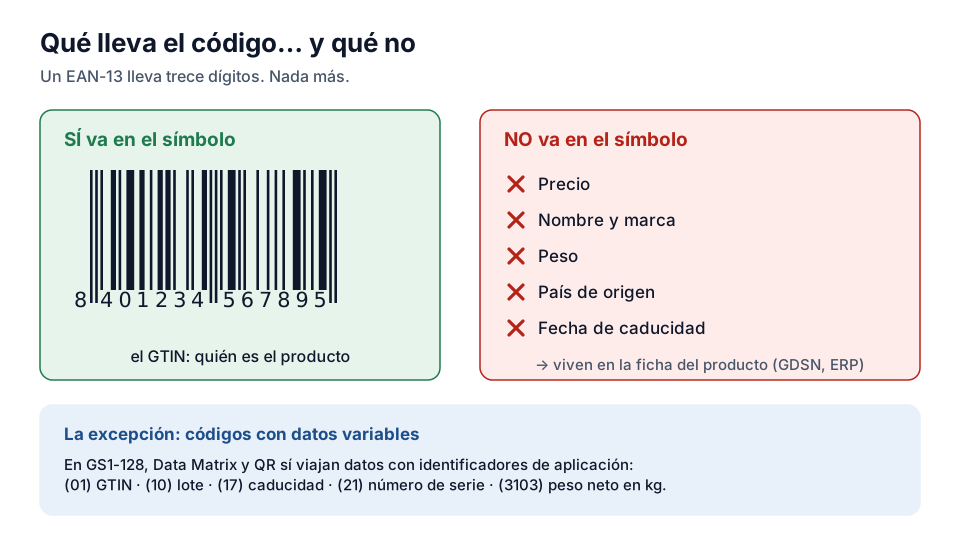
The most common mistake in the sector — and the source of half the arguments with a new customer — is believing that the barcode “contains” the product's price or name. It encodes exactly what its digits say and nothing more. An EAN-13 contains thirteen digits, and its bars are simply the way of printing them so that a laser or a camera can read them without errors.
Why the price doesn't travel in the barcode
The till reads the GTIN and looks up the price in the shop's database. This separation has huge practical consequences: the same label works with different prices in each shop, the price changes without relabelling anything, and promotions (“2 for 1”, loyalty card discounts) are applied in the system, not on the pack.
Nor do the name, the brand, the weight or the country of origin travel in it. All that information lives in the product's master data — in the GDSN if you work fully with GS1, or in each customer's ERP. The barcode is the pointer; the record is the record.
What additional data can travel
The GS1 standard allows more than the GTIN to be encoded by means of Application Identifiers (AI): batch number (AI 10), expiry date (AI 17), serial number (AI 21), production dates, variable weights, internal references. In a linear point-of-sale symbol this doesn't fit — the EAN-13 scanned at the till carries only the GTIN — but in 2D codes (Data Matrix, QR) it is normal use, and it is the basis of the unit-level traceability you will see in the Traceability and 2D Codes courses.
The rule of thumb that sums it up
Think of the barcode as a car number plate: it identifies unambiguously, it doesn't describe. Nobody expects to learn the colour of a car by reading its number plate; nor should you expect to learn the product's price by reading the EAN. When someone asks you to “put the price in the barcode”, the professional answer is: it isn't done, and that is precisely why the system works.
The exception: variable measure products
There is one case in which the symbol does carry something more than the identifier: variable measure products, such as a tray of meat or a wedge of cheese cut in store. There the weight or the price is needed in the symbol itself, because each unit is different and there is no record to look up.
Two mechanisms exist for this. Within a single shop, restricted circulation numbers are used — GS1 prefixes 02 and 20 to 29 — which only make sense in that shop and must never go out into the supply chain. For trade between companies GS1-128 is used with Application Identifiers: AI (01) carries the GTIN, (3103) the net weight in kilograms with three decimals, and so on, with more than a hundred standardised identifiers.
Why the price never travels between companies
The price not being in the barcode isn't a technical limitation but a design decision. Each retailer sets the price, it changes with promotions and it differs between countries; if it travelled in the symbol, every price change would mean relabelling the goods.
The practical corollary: if someone asks for “a barcode with the price inside” in order to sell to a retailer, what they need is a GTIN and a synchronised product record, not a different symbol. Explaining it well the first time saves weeks of misunderstandings.
Exercise
What a barcode really contains
What is the GTIN (Global Trade Item Number)?
- The manufacturer's trade name
- The unique global identifier of a product, defined by the GS1 standard
- Each shop's internal stock code
Related lessons
Reading is free. When you sign up, you also:
- You save your progress and pick up where you left off
- You take the exams, marked straight away
- You receive a completion record, with your name, for each course you finish
- You ask and answer in the Community (in Spanish)
- You get the PRO level by adding your products
- With PRO, you unlock the advanced tools: labels, GS1-128 and SSCC
Unlock PRO tools and completion records Free. The team reviews every application.
Already have access?Mark this lesson as read in My academy
This lesson is part of the course Barcode and GTIN Fundamentals, from the Barcode and Traceability Academy.
This module includes the exam “Module 1 exam: Fundamentals”.
Next lesson GTIN-13, GTIN-12, GTIN-8 and GTIN-14: when to use each 11 lessons left in the course