What happens when a barcode fails to scan
Scanning in the real world The point of sale Lesson 9 of 14
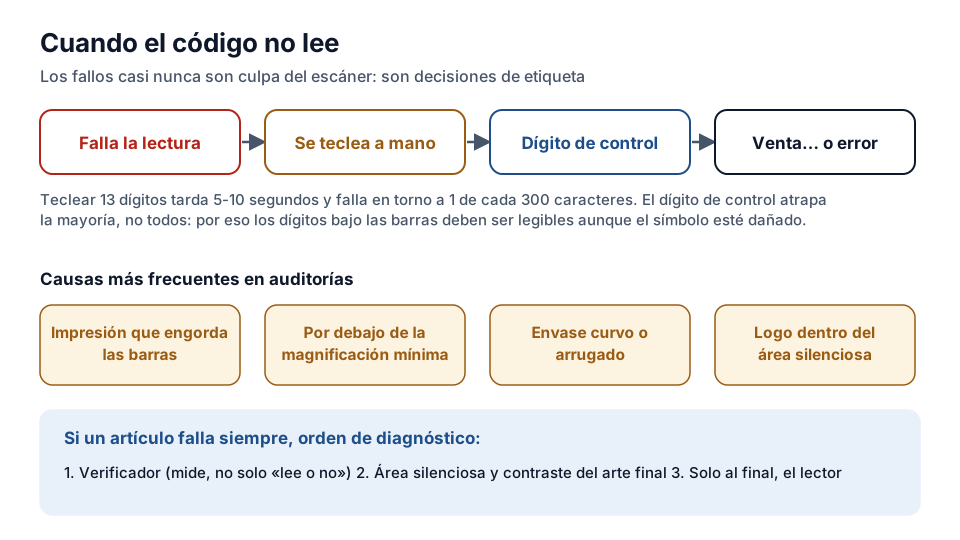
When the scanner doesn't decode, the operator keys in the number by hand or looks up the item in the system. The sale goes on — but every extra second costs money, and keying errors are real: a wrong digit sells a different product at the same price, or opens a stock incident that someone will sort out the following week.
The check digit as the last line of defence
If the symbol is damaged but the digits read don't match the check digit, the scanner rejects the read even if the image looks good: that is exactly its job. That is why you shouldn't “fix” crossed-out labels or key in illegible digits “by eye” — the system is designed to prefer a retry or a verified manual entry to a wrong read.
The real causes, in order of frequency
In point-of-sale audits, the usual causes come up again and again: poorly dried ink or low-resolution printing that fattens the edges of the bars; a symbol printed below the minimum magnification; curved or wrinkled packs that distort the geometry of the bars just where the scanner passes its line; and quiet zones invaded by the graphic design — the logo stuck to the barcode that seemed a good idea at the marketing meeting.
Each one has its fix at the design stage, which costs nothing, compared with fixing it once the product is on the shelf, which costs a lot. The practical lesson: reading problems are almost never “the scanner's fault” — they are label decisions taken months earlier.
The full cost of a symbol that won't scan
Beyond the checkout: in the warehouse, a package whose ITF-14 won't scan forces someone to open it and count by hand; in reverse logistics, a return that can't be read breaks the traceability of the goods coming back in. The symbol that reads first time is, literally, the cheapest piece of the whole chain — and the one that makes the most noise when it fails.
The real cost of keying in
When the symbol fails, someone keys in the thirteen digits. That takes between five and ten seconds and, above all, introduces a human error that scanning doesn't have: studies in the sector put the error rate of manual entry at around one in every three hundred characters, against practically zero for optical reading. The check digit catches most of them, but not all, and an error that gets past the check is an item sold wrongly and stock that doesn't add up.
That is why the human readable interpretation printed under the symbol is neither decorative nor an aesthetic requirement: it is the system's contingency plan, and it has to be legible even if the symbol is damaged.
What to do when it fails systematically
If a particular item always fails, it isn't bad luck: it is a printing or design defect and has to be treated as a quality incident. The order of diagnosis that saves time is: first verify the symbol with a verifier — not with a scanner, which only tells you whether it reads or not — then check the quiet zone and the contrast of the final artwork, and only at the end suspect the scanner.
The most expensive mistake is the other way round: replacing the scanners of a whole chain because one supplier prints badly.
Exercise
Read failures
What is the most common reason a barcode doesn't scan first time?
- The product's price is too high
- Poor printing: contrast, quiet zone or damage to the symbol
- The scanner being an imager rather than a laser
Related lessons
Reading is free. When you sign up, you also:
- You save your progress and pick up where you left off
- You take the exams, marked straight away
- You receive a completion record, with your name, for each course you finish
- You ask and answer in the Community (in Spanish)
- You get the PRO level by adding your products
- With PRO, you unlock the advanced tools: labels, GS1-128 and SSCC
Unlock PRO tools and completion records Free. The team reviews every application.
Already have access?Mark this lesson as read in My academy
This lesson is part of the course Barcode and GTIN Fundamentals, from the Barcode and Traceability Academy.
This module includes the exam “Module 2 exam: Scanning and quality”.
Next lesson Quiet zone, contrast and minimum size 5 lessons left in the course