How a scanner works: laser and imaging
Scanning in the real world The point of sale Lesson 7 of 14
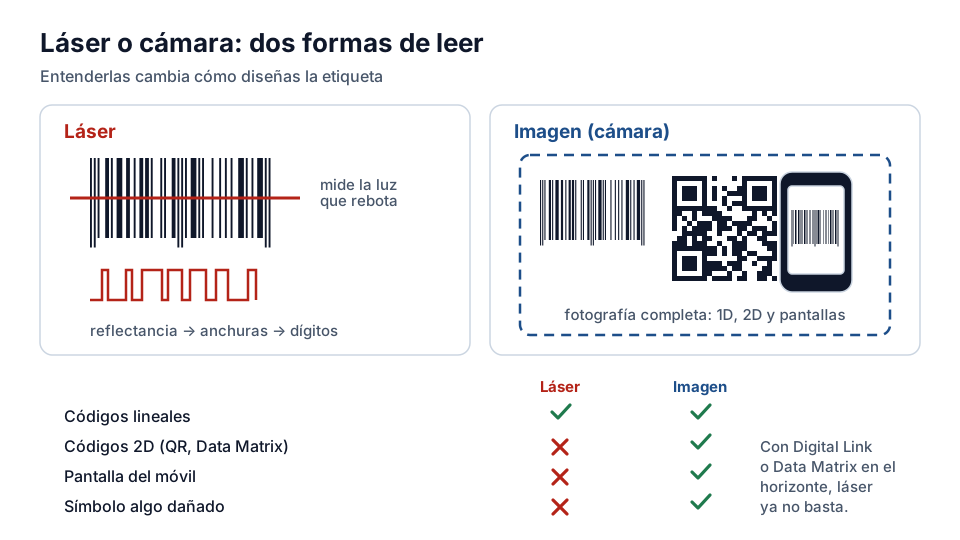
There are two dominant technologies for reading barcodes, and understanding them changes how you design your labels. The laser scanner emits a line of red light that bounces back differently from the bars and from the spaces; the photodetector converts that reflectance pattern into an electrical signal, the signal into widths, and the widths into digits. It reads fast, at a distance and on the move — that is why it dominated checkouts for decades — but it only reads linear symbols.
The imager: the camera that reads everything
The imaging scanner (imager) takes a photograph of the symbol and decodes it with software. It reads linear and two-dimensional symbols with the same camera, copes better with damaged symbols (it reconstructs them from context), reads mobile phone screens — something the laser cannot do — and is today's standard at modern checkouts, in warehouse terminals and in mobile apps for consumers.
The practical consequence for whoever does the labelling: if your customer may use imagers — and in retail they already do — your symbol must work as an image: sharp edges, good contrast, no printing effects that could confuse the software. The verification quality criteria (which you will see in the lesson on the verifier) are designed precisely to guarantee that.
Reading in real conditions
Real performance depends on factors the manufacturer controls: the angle of the label relative to the scanner (symbols curved around the neck of a bottle read worse), the speed at which it passes (a conveyor demands symbols with more margin), and the lighting — direct sunlight saturates low-cost scanners.
What to ask your customer
When you negotiate with a channel, ask two things: what type of scanner they use at the checkout and in the warehouse, and what first pass read rate they require in their supplier approval. With those two answers you will know exactly what to demand from your printer — and you will have a technical argument when they question the cost of better print quality with you.
Laser versus camera: when each one wins
The laser scanner sweeps a line with an oscillating mirror and measures how much light comes back. It is fast, cheap, works at several metres and uses little power, but it only reads linear symbologies and needs the scan line to cross the whole symbol. The imaging scanner — a sensor like a camera's — captures a whole frame and interprets it with software: it reads in any orientation, reads 2D codes and reads from a mobile phone screen, something the laser cannot do because a screen doesn't reflect like paper.
The purchasing consequence is direct: if Digital Link, coupons on the phone or Data Matrix are on the horizon, the laser is no longer good enough, however well it works today. That is the decision behind the renewal of the scanner fleet that retail faces between now and 2027.
Why reading from a screen fails
A symbol on paper works by reflectance: the bars absorb light and the spaces return it. A screen emits its own light, and does so with a brightness the scanner doesn't control. A laser measures the reflection of its own beam, and on a screen it receives a mirror-like reflection that blinds it; an imaging scanner captures the emitted light like any camera and doesn't have the problem.
That is why digital coupons and loyalty cards on the phone forced retail to change technology even before 2D codes arrived on products.
Exercise
Scanning technologies
What technology do most supermarket scanners use?
- Laser or imaging (imager) that reads the EAN-13 symbol
- Optical character recognition (OCR) of the product name
- The weight of the product on the scales
Related lessons
Reading is free. When you sign up, you also:
- You save your progress and pick up where you left off
- You take the exams, marked straight away
- You receive a completion record, with your name, for each course you finish
- You ask and answer in the Community (in Spanish)
- You get the PRO level by adding your products
- With PRO, you unlock the advanced tools: labels, GS1-128 and SSCC
Unlock PRO tools and completion records Free. The team reviews every application.
Already have access?Mark this lesson as read in My academy
This lesson is part of the course Barcode and GTIN Fundamentals, from the Barcode and Traceability Academy.
This module includes the exam “Module 2 exam: Scanning and quality”.
Next lesson First pass reads: why they matter 7 lessons left in the course